
Google Meet
star
12M reviews

Rated for 3+
info
10B+
Downloads



About this app
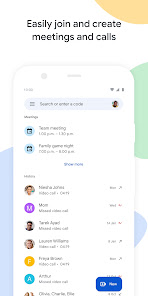
Google Meet is a high-quality video calling app designed to help you have meaningful and fun interactions with your friends, family, colleagues, and classmates, wherever they are.
Meet lets you connect in whatever way works for you: Call someone spontaneously, schedule time together, or send a video message that they can watch and respond to later.
Meet also helps you get things done. It integrates with other Google Workspace apps like Gmail, Docs, Slides, and Calendar, and offers a number of features to help you run smooth and engaging meetings, like noise cancellation, in-call chat, recordings, and more.*
Features to look forward to:
Make spontaneous calls or host video meetings with your friends and colleagues, all in one app.
Enjoy one-on-one video calls for up to 24 hours and host meetings for up to 60 minutes and 100 people at no cost.
Follow along in your preferred language with real-time translated captions in over 70 languages.
Use in-call chat to share ideas, ask questions, or provide feedback without interrupting the flow of the conversation.
Make your calls more engaging with in-call emojis that allow you to express yourself seamlessly without interrupting the conversation.
Share visuals like photos, videos, and presentations during your call to collaborate or simply share memories from your recent vacation.
Make your calls with family and friends more fun with stackable effects that allow participants to add multiple backgrounds, filters, and animations, to create a personalised experience.
Use on-the-go mode for an audio-only experience with larger call controls, making it easier to take calls with fewer distractions while walking, driving, or using public transportation.
Access on any device: Meet works across mobile, tablet, web, and smart devices,** so everyone can join.
High quality video: Show up looking your best with up to 4k video quality video***.
Learn more about Google Meet: https://workspace.google.com/products/meet/
Follow us for more:
Twitter: https://twitter.com/googleworkspace
Linkedin: https://www.linkedin.com/showcase/googleworkspace
Facebook: https://www.facebook.com/googleworkspace/
*Meeting recording, noise cancellation are available as premium features. See https://workspace.google.com/pricing.html for more details
**Not available in every language.
***Bandwidth permitting. Google Meet automatically adjusts to the highest video quality possible based on your bandwidth.
Data charges may apply. Check your carrier for details.
Specific feature availability may vary based on device specifications.
Meet lets you connect in whatever way works for you: Call someone spontaneously, schedule time together, or send a video message that they can watch and respond to later.
Meet also helps you get things done. It integrates with other Google Workspace apps like Gmail, Docs, Slides, and Calendar, and offers a number of features to help you run smooth and engaging meetings, like noise cancellation, in-call chat, recordings, and more.*
Features to look forward to:
Make spontaneous calls or host video meetings with your friends and colleagues, all in one app.
Enjoy one-on-one video calls for up to 24 hours and host meetings for up to 60 minutes and 100 people at no cost.
Follow along in your preferred language with real-time translated captions in over 70 languages.
Use in-call chat to share ideas, ask questions, or provide feedback without interrupting the flow of the conversation.
Make your calls more engaging with in-call emojis that allow you to express yourself seamlessly without interrupting the conversation.
Share visuals like photos, videos, and presentations during your call to collaborate or simply share memories from your recent vacation.
Make your calls with family and friends more fun with stackable effects that allow participants to add multiple backgrounds, filters, and animations, to create a personalised experience.
Use on-the-go mode for an audio-only experience with larger call controls, making it easier to take calls with fewer distractions while walking, driving, or using public transportation.
Access on any device: Meet works across mobile, tablet, web, and smart devices,** so everyone can join.
High quality video: Show up looking your best with up to 4k video quality video***.
Learn more about Google Meet: https://workspace.google.com/products/meet/
Follow us for more:
Twitter: https://twitter.com/googleworkspace
Linkedin: https://www.linkedin.com/showcase/googleworkspace
Facebook: https://www.facebook.com/googleworkspace/
*Meeting recording, noise cancellation are available as premium features. See https://workspace.google.com/pricing.html for more details
**Not available in every language.
***Bandwidth permitting. Google Meet automatically adjusts to the highest video quality possible based on your bandwidth.
Data charges may apply. Check your carrier for details.
Specific feature availability may vary based on device specifications.
High-quality video calling for Android & iOS phones, tablets, Google Nest & web.
Updated on
Safety starts with understanding how developers collect and share your data. Data privacy and security practices may vary based on your use, region and age. The developer provided this information and may update it over time.
- No data shared with third partiesLearn more about how developers declare sharing
- This app may collect these data typesLocation, Personal info and 9 others
- Data is encrypted in transit
- You can request that data be deleted
- Independent security review


Ratings and reviews
11.7M reviews

Mahtab Yousefi
- Flag inappropriate
- Show review history
7 June 2026
I cannot make a call anymore! I have updated the app to the last version and it doesn't let me call anymore, only saying that person doesn't receive calls and gives me a link instead and that's all! I have tried every way possible such as restarting my phone, changing my accounts, even trying with a vpn and anything, ANYTHING! Just doesn't work! somebody saves me I need my meet calls back! It's been a while now, I am just so frustrated! I'll come back and make it a 5 star if they fix that
37 people found this review helpful
Google LLC
8 June 2026
Hi Mahtab. In that case, if it continues to occur after following the recommended steps, we suggest visiting our Help Center: http://goo.gle/3arVHZC. Regards.

Ryan Cornelius
- Flag inappropriate
- Show review history
15 June 2025
Ever since they changed to the new style of meet calls, I can't make outgoing calls, but incoming calls work fine. I can clear app data and cache and get the old one back for one call and that still works. Whatever they did to meet, it's not working for me. A video calling app that doesn't make calls is pretty useless. Edit: the supplied help article isn't relevant to my issue, and I've been trying to get help from the help and feedback forum, they've tried to help but not working yet.
4,977 people found this review helpful
Google LLC
14 June 2025
Hi, Ryan. We recommend taking a look at this article: https://goo.gle/36etW3n for the issue you are experiencing. If you need more help, visit our Help Center: goo.gle/2YBmXiR. Thank you.

Lanesa Nuñez
- Flag inappropriate
16 October 2025
Can you guys create a safety feature so we can stop receiving random video chat requests from people we are not associated with? Multiple times, I have received calls from random email addresses, and it's highly unsettling. I use this app to video chat with long-distance family and friends, that's it. I don't want to receive calls from random people, and it's extremely ridiculous/tedious to block each person individually, when it could easily be prevented all together.
3,316 people found this review helpful
Google LLC
17 October 2025
Hi Lanesa. If you no longer want to receive calls or messages from someone, you can block them. To learn more, please refer to this link: https://goo.gle/4l1TMwJ. You can also send it here: Meet > Settings Menu (top left) > Send feedback. Thank you.
What's new
•Make group video calls with up to 32 people
•Share and join group calls with a link
•Take photos of your video calls
•Try doodles, masks and fun effects with Family Mode (Sign-in required with a Google Account)
•Share and join group calls with a link
•Take photos of your video calls
•Try doodles, masks and fun effects with Family Mode (Sign-in required with a Google Account)
App support
About the developer
Google LLC
support@google.com
1600 Amphitheatre Pkwy
Mountain View, CA 94043
United States
+1 650-253-0000


