
Google Calendar
star
4.82M reviews

Rated for 3+
info
10B+
Downloads



About this app
Get the official Google Calendar app for your Android phone, tablet or Wear OS device to stay organised and plan your day. Make the most of your day with easy event creation, multiple calendars, customisable views, widgets, tasks and more
With Google Calendar, you can:
• Get events automatically added to your Calendar from Gmail, including flight, hotel, concert and restaurant reservations.
• Go from using Calendar on your Android phone, tablet or Wear OS device to your computer without missing a beat when you're logged in to the same Google Account.
• Consolidate and view Google Calendar events side by side with other calendars on your device, including Exchange.
• Keep family, friends and colleagues in the loop with shared calendars, so that they can view, add or modify events.
• Quickly switch between month, week and day views.
• Stay on top of to-dos by creating and managing tasks alongside your events in Calendar.
• Personalise your Google Calendar with light or dark mode or by colour-coding your events.
• Access and organise your task lists in a full-screen view directly from the Google Calendar app.
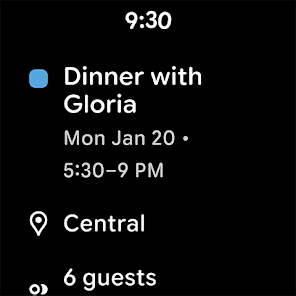
• Keep track of events or tasks while on the go with Google Calendar on Wear OS devices, which supports tiles and complications.
Google Calendar is part of Google Workspace, allowing you and your team to easily connect, create and collaborate across all your favourite Google tools. You can:
• Collaborate in a hybrid work environment by adding a Google Meet video call to an Calendar event
• Get access to professional booking pages to easily book clients and customers*.
• Schedule meetings with teammates by checking their availability or layering their calendars in a single view
• Add your working location to your calendar to make it easier for your teammates to schedule meetings with you*.
• Keep everyone on track for a meeting by attaching meeting notes, pre-read materials and other documents directly to a calendar event.
• Use Google Calendar with confidence, knowing that it's supported by Google's enterprise-level privacy, user safety and data security.
Learn more about Google Workspace: https://workspace.google.com/products/calendar/
Follow us for more:
X: https://x.com/googleworkspace
LinkedIn: https://www.linkedin.com/showcase/googleworkspace
Facebook: https://www.facebook.com/googleworkspace/
With Google Calendar, you can:
• Get events automatically added to your Calendar from Gmail, including flight, hotel, concert and restaurant reservations.
• Go from using Calendar on your Android phone, tablet or Wear OS device to your computer without missing a beat when you're logged in to the same Google Account.
• Consolidate and view Google Calendar events side by side with other calendars on your device, including Exchange.
• Keep family, friends and colleagues in the loop with shared calendars, so that they can view, add or modify events.
• Quickly switch between month, week and day views.
• Stay on top of to-dos by creating and managing tasks alongside your events in Calendar.
• Personalise your Google Calendar with light or dark mode or by colour-coding your events.
• Access and organise your task lists in a full-screen view directly from the Google Calendar app.
• Keep track of events or tasks while on the go with Google Calendar on Wear OS devices, which supports tiles and complications.
Google Calendar is part of Google Workspace, allowing you and your team to easily connect, create and collaborate across all your favourite Google tools. You can:
• Collaborate in a hybrid work environment by adding a Google Meet video call to an Calendar event
• Get access to professional booking pages to easily book clients and customers*.
• Schedule meetings with teammates by checking their availability or layering their calendars in a single view
• Add your working location to your calendar to make it easier for your teammates to schedule meetings with you*.
• Keep everyone on track for a meeting by attaching meeting notes, pre-read materials and other documents directly to a calendar event.
• Use Google Calendar with confidence, knowing that it's supported by Google's enterprise-level privacy, user safety and data security.
Learn more about Google Workspace: https://workspace.google.com/products/calendar/
Follow us for more:
X: https://x.com/googleworkspace
LinkedIn: https://www.linkedin.com/showcase/googleworkspace
Facebook: https://www.facebook.com/googleworkspace/
Make the most of your day with Google Calendar, part of Google Workspace
Updated on
Safety starts with understanding how developers collect and share your data. Data privacy and security practices may vary based on your use, region and age. The developer provided this information and may update it over time.
- No data shared with third partiesLearn more about how developers declare sharing
- This app may collect these data typesLocation, Personal info and 8 others
- Data is encrypted in transit
- You can request that data be deleted
- Independent security review


Ratings and reviews
4.66M reviews

Sara W
- Flag inappropriate
27 September 2025
used this for years now. it's good. it needs more though. it needs to have moon phases, would help for those who keep track of it, be it for gardening/farming, photography, sky gazing, etc. also would be nice to have the option to add holidays from other cultures as not everyone solely celebrates only the ones shown. it would also be nice if there were more customizable color choices for the memos. no real complaints. I like that you get notifications for your memos as well.
3,088 people found this review helpful

Rishi San Pascual
- Flag inappropriate
16 April 2025
I looove this app a lot! From scheduling my to-do list up to my business stuff. I just don't know if this is an issue on my phone but sometimes when I will add a task, it will randomly have glitches. Like, when i select the 'All day' option, the 'task' will be converted as 'event' or when I click 'save', nothing happens.
5,726 people found this review helpful

Subbarao Varigonda
- Flag inappropriate
21 January 2025
This app mostly works well and made it easier for me track many things. Recently, a defect seems to have crept in. When trying to add guests to an account, this app is not able to find contacts based on name or nickname stored in the contacts. It's expecting exact emails to be entered even though it has permissions to access contacts and could add people by nicknames in the past.
2,560 people found this review helpful
What's new
• Bug fixes and performance improvements.
App support
About the developer
Google LLC
support@google.com
1600 Amphitheatre Pkwy
Mountain View, CA 94043
United States
+1 650-253-0000


