Sobre o acesso SAML à sua organização
Ao ativar o logon único SAML para sua organização, cada integrante da organização poderá vincular sua identidade externa ao seu provedor de identidade (IdP) à sua conta GitHub existente. Para acessar os recursos da sua organização no GitHub, o integrante deverá ter uma sessão SAML ativa em seu navegador. Para acessar os recursos da sua organização usando a API ou o Git, o integrante deve usar um token de acesso pessoal ou chave SSH que o integrante autorizou a usar com a sua organização.
Você pode visualizar e revogar a identidade vinculada de cada integrante, as sessões ativas e as credenciais autorizadas na mesma página.
Visualizar e revogar uma identidade vinculada
You can view the single sign-on identity that a member has linked to their GitHub account. When available, the entry will include SCIM data. For more information, see "About SCIM."
If a member links the wrong identity to their GitHub account, you can revoke the linked identity to allow the member to try again.
- In the top right corner of GitHub, click your profile photo, then click Your profile.

- On the left side of your profile page, under "Organizations", click the icon for your organization.

- No nome da sua organização, clique em People (Pessoas).

- Click on the name of the member whose linked identity you'd like to view or revoke.
- In the left sidebar, click SAML identity linked.

- Under "Linked SSO identity", view the linked SSO identity for the member.
- To revoke the linked identity, to the right of the identity, click Revoke.

- Read the information, then click Revoke external identity.
Visualizar e revogar uma sessão ativa de SAML
- In the top right corner of GitHub, click your profile photo, then click Your profile.
- On the left side of your profile page, under "Organizations", click the icon for your organization.
- No nome da sua organização, clique em People (Pessoas).
- Click on the name of the member whose SAML session you'd like to view or revoke.
- In the left sidebar, click SAML identity linked.
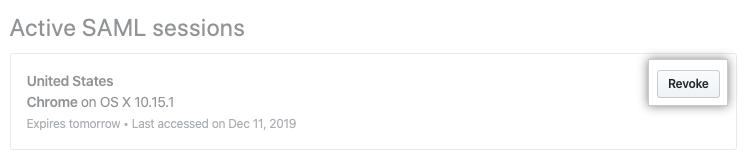
- Under "Active SAML sessions", view the active SAML sessions for the member.
- To revoke a session, to the right of the session you'd like to revoke, click Revoke.
Visualizar e revogar credenciais autorizadas
You can see each personal access token and SSH key that a member has authorized for API and Git access. Only the last several characters of each token or key are visible. If necessary, work with the member to determine which credentials you should revoke.
- In the top right corner of GitHub, click your profile photo, then click Your profile.
- On the left side of your profile page, under "Organizations", click the icon for your organization.
- No nome da sua organização, clique em People (Pessoas).
- Click on the name of the member whose authorized credentials you'd like to view or revoke.
- In the left sidebar, click SAML identity linked.
- Under "Authorized credentials", view the authorized credentials for the member.
- To revoke credentials, to the right of the credentials you'd like to revoke, click Revoke.

- Read the information, then click I understand, revoke access for this token.