Turn your smartphone into a retro gaming console: relive the classics anywhere
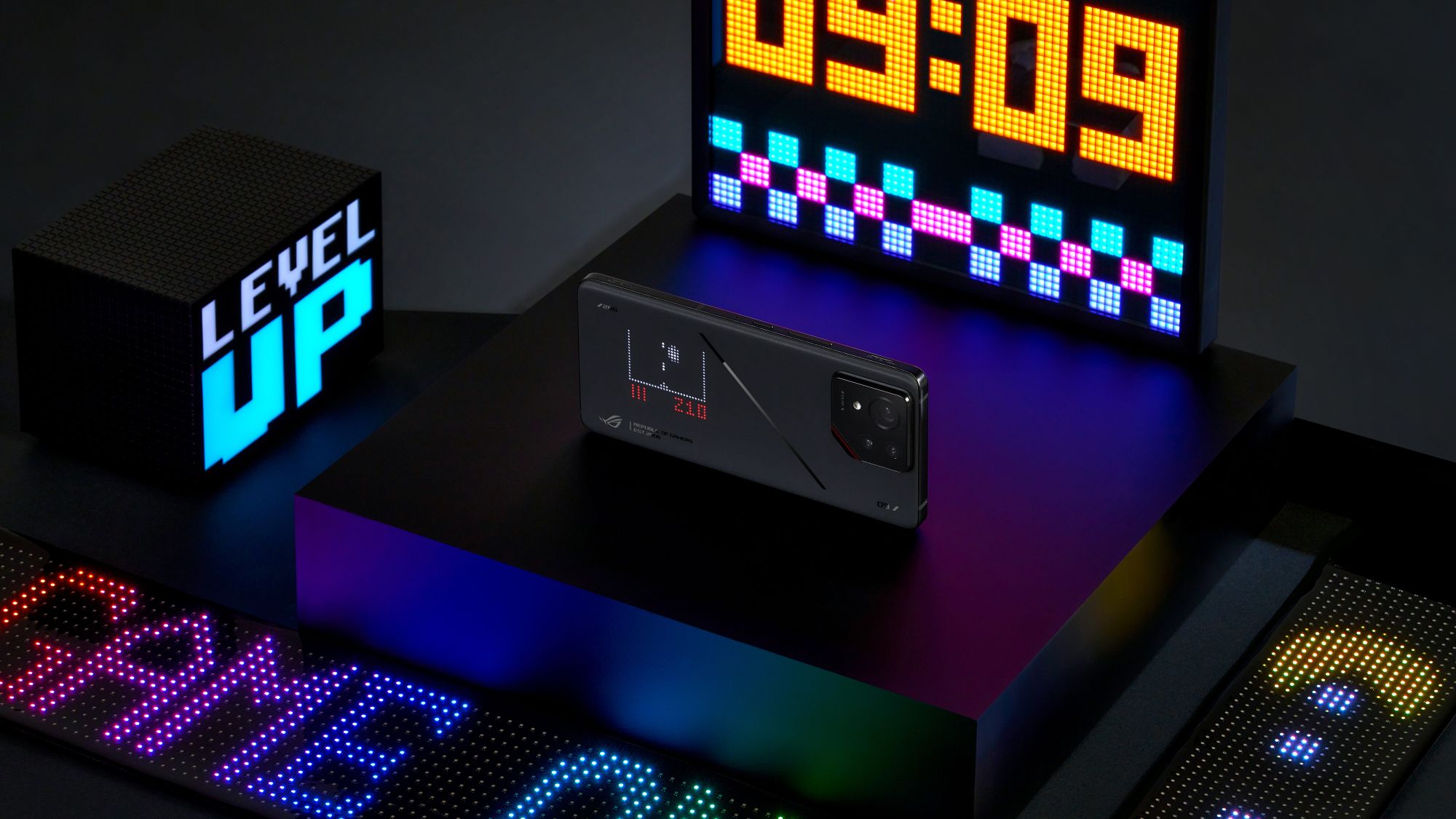
The ROG Phone stands ready to play more than just today’s most demanding mobile games — it can play the classics and help you relive the good old days of gaming anytime, anywhere. Here’s how the ultimate gaming phone helps you carry decades of gaming history right in your pocket.
Why the ROG Phone is the best gaming phone for retro games
Obviously, the ROG Phone’s cutting-edge tech makes the most of even demanding mobile games. But it also benefits classic titles in ways you may not expect.
Take the phone’s 6.78” E6 AMOLED display with a 185Hz refresh rate. Many retro games have been re-released with high-res graphics, widescreen formatting, and support for higher framerates than their original releases. This means if you want to experience the most visually sumptuous, expansive, and fluid version of the classics on the go, you’ll need the ROG Phone’s killer screen.

A lot of retro games, especially retro shooters, benefit from the ROG Phone’s AirTriggers as well. AirTriggers give you tactile, responsive “buttons” on the side of your phone akin to a controller’s bumper buttons, creating a console-like gaming experience. You can map the AirTriggers however you like, giving you control over their in-game functions.
If you’re serious about hardcore retro gaming on your ROG Phone, we even have accessories to level you up, such as the ROG Tessen mobile controller. Many classic games demand precision that can be tricky with touch controls, so having a portable controller with the thumbsticks and physical buttons of a proper gamepad can be a life saver.
The best retro games on Android's Google Play Store
As Android-powered devices, ROG Phones give you access to the Google Play Store, which is home to countless retro titles. ROG Phones also have more than enough storage to fit all your favorite classics at once (ye olde games aren’t huge installs, anyway). Here are a few all-star titles from ages past that you can pick up via the Play Store right now on your ROG Phone.
Sonic the Hedgehog 2 Classic

This free (ad-supported) Android re-release of 1992’s Sonic the Hedgehog 2 brings one of Sonic’s best classic adventures to modern-day devices. This is the game that introduced Tails, Chemical Plant Zone, and other enduring elements of the franchise. It also fully realized the series’ speedy platforming potential. The Android re-release packs neat features like the inclusion of Knuckles as a playable character, widescreen support, and a few other perks. Widescreen is a particularly big quality-of-life improvement, as it allows you to take full advantage of the ROG Phone’s spacious display and see more of a given level’s upcoming hazards.
If your need for speed persists after beating Sonic 2, go back even further in time with the Play Store release of Sonic the Hedgehog Classic. Be sure to read up on how these re-releases paved the way for Sonic Mania, the retro-modern fan favorite title from 2017.
Try out Sonic the Hedgehog 2 Classic and Sonic the Hedgehog Classic for free on the Play Store.
Doom and Doom II

No discussion of retro games is complete without a Doom namedrop. This OG FPS set the bar for hardcore action in gaming, and it remains a bloody, gory must-play to this day — as does its sequel, Doom II.
Doom’s Play Store re-release adds 16:9 support, expanding the classic 4:3 Doom experience. It also supports framerates up to 120 FPS, letting you utilize the ROG Phone’s high refresh rate E6 AMOLED screen. See more demons at a glance and mow them down with the crystal-clear, fluid motion that only high refresh rates can provide.
The ROG Phone’s AirTriggers also enhance the Doom experience, giving you trigger-esque inputs that make plowing through the father of FPS games that much more engaging and console-like.
Grab Doom and Doom II on the Play Store.
The Final Fantasy series

Classic Final Fantasy games are often considered some of the most influential, important titles in the medium, meaning they’re must-buys for retro RPG enthusiasts with a couple bucks to spare. Their timeless art direction, iconic soundtracks, and strategic, addictive JRPG gameplay make each one easy to dive into even today. Their complex stories have aged equally well, giving mobile gamers a plethora of rich adventures to enjoy on the go — especially considering just how many re-released Final Fantasy classics are on the Play Store.
Many Final Fantasy Android re-releases feature a wealth of updates to the original titles, including high-res graphics, cloud saves, and various quality-of-life tweaks. So new and old fans alike will have a lot to look forward to.
Check out fan-favorites Final Fantasy VI and Final Fantasy VII on the Play Store, along with plenty of other legendary, classic Final Fantasy titles.
Castlevania: Symphony of the Night
 Image credit: Google Play
If you’ve ever played a game in the “metroidvania” genre and wonder where that descriptor came from, Castlevania: Symphony of the Night is half the equation. This legendary title revolutionized the Castlevania series and helped cement the kind of experience non-linear exploration could be in 2D platformers.
Symphony of the Night is without a doubt one of the greatest metroidvanias you can snag on the Play Store. Fans of gothic vibes, vampiric spookiness, platforming, and exploration owe it to themselves to check out this gem. Doubly so if you’re a secret-sniffer who loves discovering new goodies in old areas after unlocking abilities and backtracking. The Play Store re-release packs achievements, giving you that much more reason to uncover everything Symphony of the Night has to offer. And since this spruced-up re-release isn’t on PC, even PC gamers have a reason to check it out on their ROG Phone.
Pick up Castlevania: Symphony of the Night on the Play Store.
Other retro-style games on the Play Store

The popularity of retro games is so great that many modern titles deliberately pull from the classics with old-school flair. Pac-Man 256 is a contemporary take on the timeless dot-munching Pac-Man experience you know and love, with some great modern bells and whistles throw in. For those who adore old-school, arcade-style beat-’em-up titles, throwback brawler TMNT: Shredder’s Revenge stars everyone’s four favorite ninja turtles in their best 2D outing yet. Meanwhile, Dead Cells pairs elements of modern metroidvania design philosophy with the now-beloved roguelite gameplay elements it helped revive. Its pixelated visuals, fast-paced combat, and precise platforming feel simultaneously fresh and classic at the same time (and it’s even got a Castlevania-themed DLC).
You can dive into all these modern-retro fusion titles, and many more, on the Play Store right now.
Play retro games on your ROG Phone 9 Pro with AniMe Play

Proud owners of the ROG Phone 9 Pro can venture beyond the Play Store for an even more retro experience. We’re talking about the AniMe Play feature built into AniMe Vision, the array of mini-LEDs on the back of the ROG Phone 9. On the ROG Phone 9 Pro, there are enough mini-LEDs for you to play entire games on the back of your phone, no screen required.
To access AniMe Play on your ROG Phone 9 Pro, tap the AniMe Play app icon on your phone’s home screen, pick your game, flip your phone over, and use the AirTriggers to control the action. For a real-time look at how to access the feature, click here for a short video guide showing how to boot up AniMe Play. Alternatively, check out our AniMe Play guide on the ROG forum.
You’ll have four AniMe Play games to choose from. For a classic “hop over obstacles while moving quickly” runner-type game, try Speedy Runner. Action fans may prefer Aero Invaders, which sees you blasting pixels out of the sky in your own little fighter jet. Snake Venture tasks you with gobbling dots as an ever-growing snake. And Brick Smasher has you smash bricks, lobbing destructive dots at them — perfect for when you’re in the mood to tear stuff down.
When you look at the front of the ROG Phone 9 Pro, you’ll see your retro games from the Play Store displayed on a glorious 6.78” E6 AMOLED display. Then, when you flip the phone over, you can go “back” (get it?) in time to an even more old-school look for the ultimate retro experience. No matter which way you play, you’re guaranteed a fun blast from the past.
Author
Popular Post

Prepare for Tandem OLED splendor with these new ROG gaming monitors
How to configure your PC's RGB lighting with Aura Sync

How to upgrade the SSD and reinstall Windows on your ROG Ally, ROG Xbox Ally, or ROG Xbox Ally X

Graphics cards, monitors, motherboards, and more: everything ROG announced at Gamescom 2025

Red Dead Redemption 2 on the ROG Ally: performance guide & best settings
LATEST ARTICLES

Turn your smartphone into a retro gaming console: relive the classics anywhere
The ROG Phone stands ready to play more than just today’s most demanding mobile games — it can play the classics and help you relive the good old days of gaming anytime, anywhere.

How to choose the best holiday gift for gamers: why the ROG Phone makes Christmas unforgettable
The ROG Phone 9 is a gaming beast that’s hard to beat. But it’s also a high-powered handset with the near-limitless utility of a premium smartphone.

Can the ROG Phone Play PC Games? Exploring the Possibilities
There are plenty of ways you can get your AAA gaming fix on an ROG Phone.

Cooling Solutions for Gaming Phones: A Deep Dive into ROG’s Thermal Mastery
Discover how ROG revolutionizes mobile gaming with advanced cooling solutions like the GameCool 9 system and AeroActive Cooler X Pro, featuring cutting-edge thermoelectric technology powered by the Peltier effect.

ROG Phone 9 Pro AI Gaming: Smarter Wins Start Here
Discover how the ROG Phone 9 Pro revolutionizes mobile gaming with AI-powered features that enhance performance, optimize gameplay, and give you the competitive edge.

The ROG Phone 9 and ROG Phone 9 Pro level up mobile gaming
The ROG Phone 9 and ROG Phone 9 Pro crank up performance, battery life, and more for a true next-gen mobile gaming experience.