 Domain Search
 Domain Transfer
 All TLDs
 WHOIS LOOKUP
 AE Domains
 SSL Certificates
 cPanel Web Hosting
 Windows Hosting
 Affiliate Program
 WordPress Hosting
 Dedicated Hosting
 Email Hosting
 Reseller Web Hosting
 Web hosting
 VPS Hosting
 Managed VPS Hosting
 AI Website Builder
 Online Shop
 Web Design Services
Windows
Hosting in the UAE
Run your ASP.NET applications with confidence.
Enjoy seamless hosting with IIS, MS SQL Server, Plesk, and more—all backed by reliable uptime and local UAE support.

…

…
Powerful Features for Your Windows Hosting
-
Expert Customer Support for managed hosting plans
-
Free Auto-Installed SSL Certificates
-
Plesk Control Panel – flexible and user-friendly
-
Loyalty Rewards to save on future upgrades
-
1-Click Installation for WordPress, Joomla, Drupal, and more
-
24/7 Security Monitoring with DDoS protection
-
Quick App & Domain Setup with one-click tools
-
MySQL & MSSQL Database Support (2012 / 2016 / 2019 versions)
-
200MB Database Storage included
What Our Clients Are Saying:
I can’t believe it’s been six years since I first signed up for web hosting with Truehost. They have been nothing but reliable, and the customer service is impeccable. I have had a few times where my site went down for an extended period of time, and each time Truehost was quick to respond and helped me get back up and running again.

I am not a tech expert, but I know a thing or two about hosting providers and what they should offer. I wanted to try out Truehost and see if they were worth their praises so I signed up for one of their plans. And boy, did they deliver! The customer service was top notch and the features that came with my plan allowed me to customize my site


Why Choose Truehost Windows Hosting
-
Competitive Pricing: Cost-effective plans that deliver strong performance and reliability.
-
Comprehensive Features: All-inclusive solutions tailored for a wide range of business requirements.
-
Developer-Ready Environment: Full support for various programming languages and modern frameworks.
-
Advanced Security Systems: Proactive security measures to safeguard your data and ensure maximum uptime.
-
Dedicated Customer Support: Expert technical assistance available whenever you need it.

Enterprise-Grade Security
Our integrated security stack, featuring Windows Server, Plesk, advanced Firewall, Anti-DDoS, and Antivirus protection, delivers the most secure hosting environment available.
What Truehost Cloud Windows Hosting Delivers
Plesk Obsidian
Plesk offers the most user-friendly way to manage your Windows servers.
Windows Server 2019
Truehost Cloud operates on the powerful and up-to-date Windows Server 2019 platform.
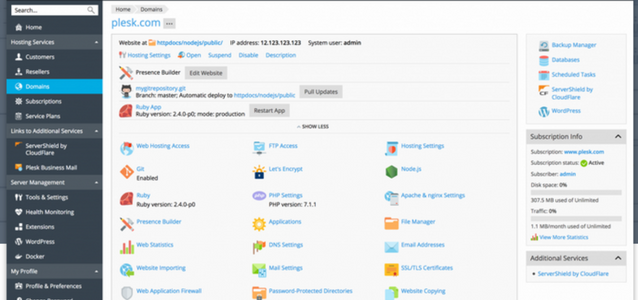
One-Click Applications
Our control panel lets you deploy popular applications instantly with a single click.
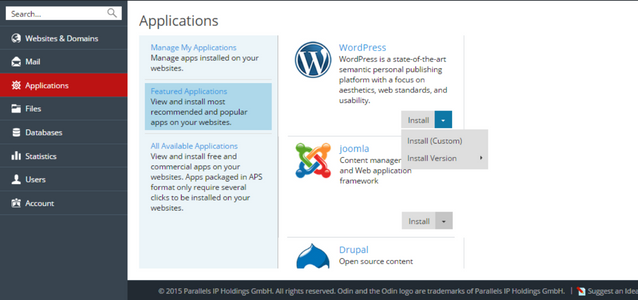
WordPress Toolkit
A complete WordPress environment featuring staging sites, caching technology, auto-installation support, and pre-installed themes and plugins.
Client Reviews
Windows Hosting FAQs
What does Windows Hosting entails?
Windows Hosting refers to web hosting services that use the Windows Server operating system. This environment supports Microsoft-specific technologies like ASP.NET, .NET Core, MSSQL databases, and integrates seamlessly with other Microsoft products such as SharePoint or Outlook. It typically includes the Plesk control panel for management and offers compatibility with applications built using Visual Studio. This type of hosting is ideal for businesses or developers whose projects rely on Microsoft’s technology stack, providing a stable, familiar, and fully integrated ecosystem for deploying web applications and services.
What is Web Hosting?
Web hosting is a service that allows individuals and organizations to make their websites accessible on the internet. A hosting provider allocates space on a physical server where all the website’s files, databases, and content are stored and served to visitors. It includes maintaining server uptime, security, and bandwidth. Different types exist, such as shared, VPS, dedicated, and cloud hosting, each offering varying levels of control, performance, and scalability. Essentially, web hosting is the foundational infrastructure required for any website to be live and operational online.
Linux vs. Windows Hosting: What’s the Difference?
The primary difference lies in the server operating system and supported technologies. Linux Hosting runs on open-source Linux OS, typically uses cPanel, and supports PHP, MySQL, and Perl. It’s often more cost-effective. Windows Hosting uses Windows Server OS, integrates with Plesk, and natively supports ASP.NET, .NET Core, MSSQL, and Microsoft Access. The choice depends on your website’s requirements: Linux suits PHP-based apps like WordPress, while Windows is necessary for applications built with Microsoft technologies. Windows hosting also offers tighter integration with other Microsoft services.
Can I run WordPress on Windows Hosting?
Yes, you can run WordPress on Windows Hosting. While WordPress is traditionally optimized for Linux (PHP/MySQL), modern Windows servers with IIS can run PHP and MySQL efficiently. Many Windows hosting providers offer one-click installers for WordPress via Plesk or other tools. However, performance might differ slightly from a Linux-optimized environment, and some Linux-specific features (like certain .htaccess rules) require alternative configurations in IIS. For users already invested in the Windows ecosystem or needing to run other Windows-based applications alongside WordPress, it is a viable and fully supported option..
Which databases are supported on Windows Server?
Windows Server natively supports Microsoft SQL Server (MSSQL) in various versions (e.g., 2012, 2016, 2019), which is tightly integrated with ASP.NET applications. It also fully supports MySQL and Microsoft Access databases. Additionally, through configurations, it can support MariaDB and PostgreSQL. This flexibility allows developers to choose the right database for their project, whether they are building enterprise applications with MSSQL or using open-source solutions like MySQL for applications such as WordPress or custom PHP scripts, all within the same Windows hosting environment.
When Should You Use Windows Hosting?
You should choose Windows Hosting when your website or web application is built using Microsoft technologies such as ASP.NET, .NET Core, or VB.NET. It is also necessary if you require MSSQL databases or integration with other Microsoft services like Exchange, SharePoint, or use Microsoft Access. Businesses operating in a predominantly Windows-based IT environment for consistency and easier management will also benefit. If your development tools are Microsoft-centric (e.g., Visual Studio) and your team is proficient in the Microsoft stack, Windows Hosting provides the compatible and optimized platform you need.
Looking for the Best Windows Hosting Provider?
To find the best Windows Hosting provider, prioritize those with: proven reliability (high uptime SLAs), local or regional data centers (for lower latency in your target market, like the UAE), strong security features (DDoS protection, firewalls), responsive 24/7 technical support, and a user-friendly control panel like Plesk. Look for providers offering scalable plans, support for the latest .NET and MSSQL versions, and transparent pricing. Truehost, for example, offers Windows hosting with UAE-based support, Plesk control, and a commitment to performance, making it a strong candidate for businesses in the region.
What is Plesk, and why is it used with Windows Hosting?
Plesk is a powerful, commercial web hosting control panel used to manage servers, websites, and applications. It is the industry-standard alternative to cPanel for Windows environments. Plesk provides a graphical interface to manage domains, email accounts, databases (MSSQL, MySQL), security settings (SSL, firewalls), and install applications (like WordPress) with one click. Its integration with Windows Server and IIS makes server administration accessible without requiring deep command-line knowledge. For users on Windows Hosting, Plesk is the preferred tool for its compatibility, ease of use, and comprehensive feature set tailored for the Windows ecosystem.
Is Windows Hosting more expensive than Linux Hosting?
Typically, yes, Windows Hosting is often slightly more expensive than comparable Linux plans. This is due to licensing costs associated with the proprietary Windows Server operating system and other Microsoft software like Plesk or MSSQL. Linux, being open-source, does not incur these licensing fees. However, the price difference has narrowed, and the total cost must be evaluated against project requirements. If your application stack demands Windows-specific technologies, the investment is necessary and justified. Many providers offer competitive Windows hosting packages that include essential features, making the overall value comparable when the required technology stack is considered.
How do I migrate an existing website to Windows Hosting?
Migrating a website to Windows Hosting involves several key steps. First, back up all files and databases from your current host. If moving from a Linux host, you may need to adjust configuration files (e.g., convert .htaccess rules to IIS web.config). Upload your files to the new Windows server via FTP or Plesk File Manager. Import your database (converting to MSSQL if necessary) and update the website’s connection strings. Finally, update your domain’s DNS records to point to the new Windows hosting server’s nameservers. Many providers, including Truehost, offer assisted migration services to ensure a smooth and secure transition.
